Showing posts with label Firefox. Show all posts

Saturday, June 21, 2008

Firefox 3 Extensions

First of all, I really do love Firefox 3. Most people already knew I preferred Firefox to all other browsers. Firefox 3 was exactly the kind of updated I like. It didn't add a bunch of extra fluff and bloat that I didn't need. Instead, they focused on making it quicker, more stable, and even simpler to use. Fantastic.

People often ask what extensions I like or must have. I used to have a monstrous list back in the early Firefox days. Anything that seemed remotely useful I added. I have since tried to make my list be more of an "essentials" list. Some will argue my list is still fairly large, and some are still just niceties. However, I find that every item in my list in some way enhances my browsing experience on a nearly daily basis so they are all worthwhile.

I didn't feel like exporting a text list, so I'm going to be lazy and give you a screenshot instead. About the only extension I would really still like is a better version of the Google Calendar notifier that I used to have (which doesn't work in FF 3).

Tuesday, June 12, 2007

Browser Showdown

Following up on my previous Safari post, I noticed that Ryan had compared the screen real-estate used by the two browsers.

I'm liking Safari a bit more as I use it again, but they still need to fix the font display and some windowing usability before I can test drive it on a daily basis.

Pointing out once again the flexibility of Firefox though, I thought I would post how the 2 browsers compare on my system:

Software and the idiots who use it

I needed something to get me fired up (many of you will find that hard to believe). This will definitely do it.

As many know, Apple released a version of their Safari web browser for Windows yesterday at their WWDC developer conference. An unexpected move for many, including myself, and one that spawned a good amount of discussion and pondering.

Don't confuse pondering with pandering though, which is what many in the tech community love to do so much. The bits had barely hit the web before people were trashing the release. I'll admit, I tried it immediately, and was less than impressed with the usability and visual aspects of this particular build. Guess what? It's beta. Should this be a surprise? So, rather than bitch continuously, I simply closed it and will wait for a later version to do additional evaluation. After all, Apple actually still uses beta to mean pre-release, not perpetual unwillingness to claim completion like other companies.

The worst of these were some of the security exploits supposedly found, as covered by Slashdot. The first of these idiots is the guy who supposedly had found a bug in Apple's Airport, only to be smacked down later. He claims he found a bunch of holes, but he will not be disclosing them to Apple. Fantastic, great plan. Run around, spouting off about how great you are and poking holes in software, rather than attempting to improve something. Specifically, a beta, which is released entirely to attempt to find issues and get them fixed before release. These people need to have their Internet pass revoked.


Personally, I want to see Safari not only succeed, but excel. Mostly, because I want some competition to push my favorite browser, Firefox, a little harder. At this point, I really don't see myself ever moving to Safari. I like some of its features, but I have nearly all of them already courtesy of extensions. Extensions are still the silver bullet of Firefox for me. Also, I find Firefox to still run very snappy, and I have his memory in check on my machine. I look forward to some friendly competition between the two to keep improving them both.

Sunday, September 3, 2006

New Hotness

I tried out the new Firefox 2.0 Beta 2 tonight. Very slick. At least 5 extensions I used to need are now rolled into the software. Most other extensions were ready for 2.0 and worked immediately. I have yet to have any problems with it, very solid.

I researched a bit for Ryan, and found that SVG animations are not slated to arrive until Firefox 3. However, I was reading up a bit on SVG, and not only found a really good resource, but some tricks to do SVG animation with Javascript. Check this page out for some good SVG information.

Wednesday, August 16, 2006

Services, Slick Integration, Score

Somebody started a discussion a while back about how blogs and communities online are not as nicely integrated and connected as they should be. Most places end up being the equivalent of the message board at the local supermarket. Things are posted, glanced at once, and then forgotten until they are completely irrelevant. There isn't much interaction or useful conversation, if any at all.

Lifehacker, that wealth of knowledge, has talked about coComment before as a way to solve some of these issues. I thought it sounded interesting, but still took more effort than I was willing to expend to even check out the site. However, today they throw in the magic words "Firefox extension", so now I have to check it out.

Basically coComment is a way to centrally track the various blogs and conversations that you have interacted with. Now, with the extension, Firefox can even let you know that there is new activity on a conversation in which you have participated. When you post on a supported blog, you can say "track this", and even tag it to create categories of conversations. All very slick.

The Firefox extension is well-written, looks nice, and just plain works. You don't use Firefox all the time and can't make use of this? Wow, how do you keep from the monsters in the closet eating you every night? Go download it and save yourself. Quick.

You don't really care about any of this, think Internet conversations are dumb, and just want things to stay as they are? Go back under your rock.

Sunday, April 9, 2006

About Time

I love Firefox. I really love Firefox extensions, that is where the true value of the browser shows up to me. What I don't like, is that extensions aren't easy to keep up-to-date. Since there are a steady stream of bugfixes, new features, and workarounds being developed, that is very unfortunate.

It seems to me that the 1.0x branch of Firefox did a reasonable job of keeping most extensions updated, at least those from either mozdev or addons.mozilla.org anyway.

Then, when the 1.5x (deer park) branch was being developed, there were promises of a much better updater for Firefox. It was going to more granular, allowing for only necessary pieces to be downloaded and updated, and it was going to be much more reliable. However, the only real change I have seen to this point is that my extensions now never updated on their own, despite screenshots such as this leading to believe to the contrary:


This wasn't going to last long though, so here is an extension which takes care of automatically notifying/updating when extensions are updated. Very nice.

I found this tip through Lifehacker once again.

Tuesday, March 7, 2006

Trials and Tribulations of Software

Ryan posted a thorough post yesterday about the fantastic new iCalendar standard that is quickly gaining steam, and also about its remaining deficiencies. As with any software (unfortunately and to my chagrin) I discovered a few more deficiencies while I was playing with it a bit.

The first should have been obvious to me, being a Linux guy who has worked with servers for years, but Ryan was the one who figured it out. When I tried to download Ryan's sample .ics file, it just showed up as text in the browser -- pasted here for your learning pleasure:
BEGIN:VCALENDAR
X-WR-TIMEZONE;VALUE=TEXT:US/Pacific
METHOD:PUBLISH
PRODID:-//Thoughts Abound\, Inc//iCal 1.0//EN
X-WR-CALNAME;VALUE=TEXT:Example
VERSION:2.0
BEGIN:VEVENT
SEQUENCE:5
DTSTART:20060307T200000
DTSTAMP:20060307T011706Z
SUMMARY:Read Thoughts Abound
UID:EC9439B1-FF65-11D6-9973-003065F99D04
DTEND:20060307T210000
BEGIN:VALARM
TRIGGER:-P1D
ACTION:DISPLAY
DESCRIPTION:Event reminder
END:VALARM
END:VEVENT
END:VCALENDAR
This is because our lovable Apache server did not yet have the proper mime type of text/calendar associated with .ics files. Changed that, and everything behaves correctly...or differently as it turns out.

I expected after making that change to now see the Firefox save-or-open dialog defaulting to Outlook, just as Ryan posted. However, I was surprised to see this instead:


Oh yeah, I have a beta of the Mozilla Calendar extension for Firefox installed. This is the same code they use for the standalone Sunbird client they are writing, it is just packaged as an extension to Firefox or Thunderbird. Sweet, another test case!

It's a good thing Calendar is still in beta, because this one is horribly lacking in the integration department. It defaults to creating an entirely new calendar for me, which is probably not what I want. However, it also does not allow you to add it to an existing calendar. Not only is there no drop down list of existing calendars to select from, but if you do manage to type the name of your calendar exactly, it creates a new one with an identical name. Bad, all bad -- get to work on this Mozilla guys. Here is a screenshot after it was added (click on it if it is too small to read):

Okay, so I disable the calendar extension and figure surely now I will have it go to Outlook. Sure enough, I get the open with Outlook dialog as posted by Ryan. Now, there is no way it can fail, right? Wrong. Ready for another screenshot?


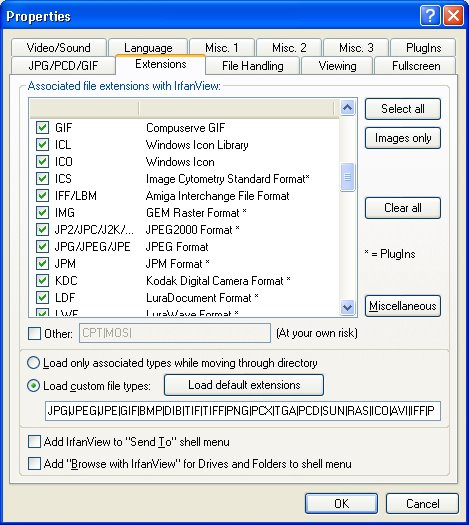
I use the excellent freeware program IrfanView for viewing graphics files. The reason it is even trying to open this file and generating this error message, is because it has a file association for .ics files (hmmm, seems like we are in a roundabout way back to the MIME type issue). For all but the one person in the world who knew what a .ICS graphics file is, here is the association list from IrfanView:


Image Cytometry Standard Format. Rolls off the tongue nicely, doesn't it? Okay, so I uncheck that box, and now when I click on the file, everything works as expected and promised.

Wow, we have just seen a demonstration of how software is still not ready for prime time. Better stated, there is a gaping hole where integration is lacking in software, and that is where I think great strides (and possibly money) can still be made by developers. I shouldn't have to be a Software Engineer to figure out how to make this stuff work, but I do when stuff like this happens. That's alright, it just provides motivation to me to make my products that much better.

Now the preaching is over...

Wednesday, February 15, 2006

Software is evil and will be the death of me

This was going to simply be an update to the last post. However, I really wanted to drive the number of posts for today even higher. No, not really.

Actually, the title sums things up pretty well. I love writing software, probably way too much. I can't tell the number of times I have wanted to get a bunch done at night, or had other things to do, but instead spent hours writing a piece of software. It is equally amazing how diverse and/or useless that software might be. I can't help it, I'm a code junkie. The more obscure and kitsch, the more likely I am to want to work on it, it seems.

Tonight's bit of coding resulted in my first bit of greasemonkey code. Nothing spectacular to that, as Greasemonkey scripts are just Javascript, which I have actually written a fairly large amount. My work was not spectacular either, as I was simply modifying the script I mentioned in the previous post. However, I am still happy, because I learned a bit about the inner-workings of Greasemonkey, I got to brush up on my Javascript skills, and I ended up with a script that actually works, as opposed to the one I posted earlier.

Here is the updated script.

Any color you want as long as it's black

Some guy who is obsessed with three stripes or something recently wrote about the new photocasting support in iPhoto. It all sounded grand when handed down from upon high by Jobs, only to turn into an exercise in proprietary methods and mis-implementation of pseudo-standards.

There are many gripes about this around the net. Dave Winer, the credited creator of RSS, providing as usual some of the most vehement. Today I found a page with the most truly informative postings about it that I have seen yet. These guys are an order of magnitude above me in their understanding of XML and RSS. Not surprising, as they were in it from the beginning, which makes things much easier, and the fact that I just don't have time to keep up with the whole of all technologies.

I was glad to find someone on that page had created a Greasemonkey script (screenshot) that I could add to Firefox to make those photocasting pages as least usable in their current, standard-smashing form.

As usual, big company provides something bad, open source hackers find a slick way around it. Good job guys.

I Spy

Spyware, that inherently evil beast lurking out on the Internet, turns out to actually be very controllable with the appropriate software steps.

First, of course, is quit running that screen door on the front of your computer known as Internet Explorer. Switching to Firefox pretty much single-handedly stopped any spyware from appearing on my computers that I use.

Next, keep an anti-spyware program around, just in case. I have ran various versions of these over the years (all free of course, the pay spyware program are often spyware themselves, or simply don't offer any benefits over free). I initially used AdAware, and then later added in Spybot Search and Destroy to pick up some that AdAware missed. However, when Microsoft bought Giant and released their product as Microsoft Anti-Spyware beta, I switched to that and never looked back.

Microsoft (actually Giant)'s product had a much simpler user-interface, found 100% of the spyware, including some the others missed, and generally seemed to just work. Being a beta, there were some things I didn't like of course. Navigating in the UI was sometimes non-obvious. Mostly I didn't like that if you were running a scan and decided to change an option, it stopped the scan. Also, Microsoft obviously hadn't fully integrated the code, as it still showed up in process explorer as Giant Antispyware and the look and feel was theirs.

Yesterday though, Microsoft released beta 2 of the product, and it is now renamed to Microsoft Defender. A bit of an ambiguous name, but I like the product a lot. It now looks, feels, and behaves like a Windows product (a good thing in this case). The user-interface is now very simple and easy to use, and overall it is very nicely integrated and automated. It can just sit there and do its job like I want. I recommend installing it. It is one of the downloads that require verifying that you have a "Genuine Windows" installation, but that isn't a big deal. Microsoft now even provides a nice helper application to allow validation while running Firefox.

Finally, since this has turned into a bit of a Internet protection post, I would recommend running AVG as an anti-virus program. Yes, viruses are not the big of an issue, since I don't run untrusted programs. However, I get enough emails with viruses in them, that it is nice to have AVG take care of that for me. There are probably other good free virus scanners, but overall I prefer AVG.

Wednesday, February 8, 2006

Google Chat Redux

Well, I blogged really quick about the new chat feature in Gmail the other day. Now, one of my accounts has the full functionality. Here are my thoughts on it thus far.

First, here is the screenshot I received that let me know my account was finally ready (sorry it is so small, click on it for a more readable version):

I said "sweet", let me try it out. Unfortunately, I didn't see anything upon logging in to my account. This is because I had Google Talk already signed in with that account. Keep this in mind, as it will come into play later. I signed out of Talk, and boom, I am presented with AJAX chat goodness and quick contacts.

(At this point I wanted to include some screenshots, but Google is having some issues with chat. It has temporarily disappeared from my account. Waiting for it to reappear...). Okay, I got tired of waiting, UneasySilence has some screenshots you can view instead.

Overall, the interface is very slick. The pop-out or pop-in arrows down in the lower right corner of the chat window are very nice. You can choose to keep the slick chat hovering over your lower right-hand corner of Gmail, or pop the chat out into its own window. You can also minimize the chat to a small bar in your Gmail. At this time, you cannot move the window when it is "popped-in".

Quick contacts work fairly slick as well. You can specify for any given contact by hovering over them if they should appear in the quick contact list or not. The quick contact list looks very much like Google Talk. Your status is indicated in the same manner, and you can still specify your status/tagline.

Overall, my very short experience chatting with it was positive. It worked as I would expect. We ran a few tests to try out some more interesting scenarios. First, we wondered how notification would work. If you browser is open to Gmail, even with the chat window closed, it will pop back open as soon as someone send an IM. If the browser is minimized, or you are in another tab, the title bar or tab text will change, but the focus will not. This lack of notification seems like enough of a reason to need to keep Google Talk around for the time being.

One thing I wasn't completely sure I liked is a new hover feature. Now, anytime you hover over a message in Gmail, you are presented with some quick contact options for that sender. Google designed it well enough not to interfere with your action on that message, but it does clutter the UI a bit.

The second thing I didn't really like, was when I restarted Google Talk, I started receiving chats in both my browser and Talk. I didn't get a chance to fully test this though before Google experience the issues I mentioned above and I lost my quick chat capability. I'll retest when it returns. I would really hope that having Google Talk active, would remove the chat capability from that Gmail account, as I originally found when trying to initially use it. We shall see. It's highly possible that I am bringing some of these inconsistencies on myself too, since I use multiple Gmail accounts, and have the Firefox Gmail manager extension.

Overall, this seems as usual to be a well-designed and implemented feature from Google that simply improves my experience using their services.

Update: It appears it may be Gmail manager that is doing me in on the chat service. Whenever it is active and logged into both of my accounts, I lose the quick contacts feature. I don't think I can function without the Gmail manager anymore, so I guess I will have to either wait or do without the chat feature from within my browser. At least logging chats still works.